



What’s new?
Capture Company Only
While PCR Capture has always helped recruiters fill their private database with Name contacts, in some cases it may be useful to import an organization’s contact info without a specific person at that company.
With this update, PCR Capture’s ‘Add / Update’ prompt will be triggered when you visit a Company page on LinkedIn. From there, you can import or enhance that company’s record in your database without involving any Name record. We anticipate extending this feature to recognize company data on additional websites in future updates.
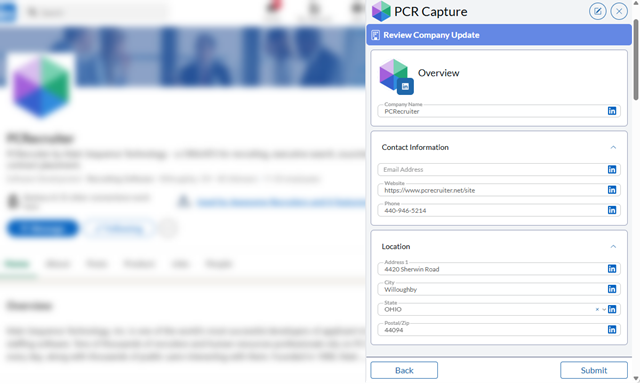
In addition, you may now add Activities, Notes, and so forth to Company records while capturing a Name or Company.
Right-Click to Capture
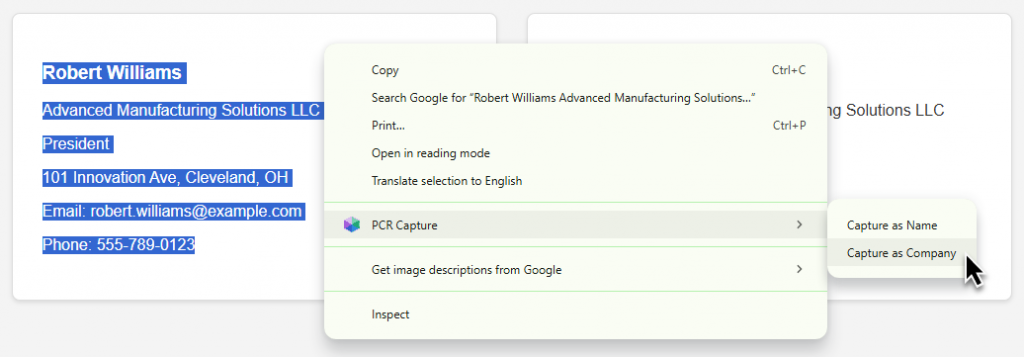
While PCR Capture is designed to automatically recognize contact data on popular social networks and job boards, there are times when you’ll encounter a block of contact info elsewhere, such as a company website, a directory listing, an email signature, or a search result.
In this new version, you can highlight the content, right-click on it, and choose to capture it as a Name or Company contact. PCR will attempt to parse the text into fields and process it like any other captured information.
There are many new features and announcements on the way this year. Follow this blog here, on your PCR login screen, or on your social network of choice!



2 Responses
Just want to thank you for this update. It is such a timesaver and something I had wished I had available within PCR Capture. Great addition!!
Glad you like it! We’ll pass along your compliments to the dev team.