



Recruiting CRM
Recruitment CRM Software Built Around Your Desk

SOC 2 Examined

US-Based Support

Since 1998
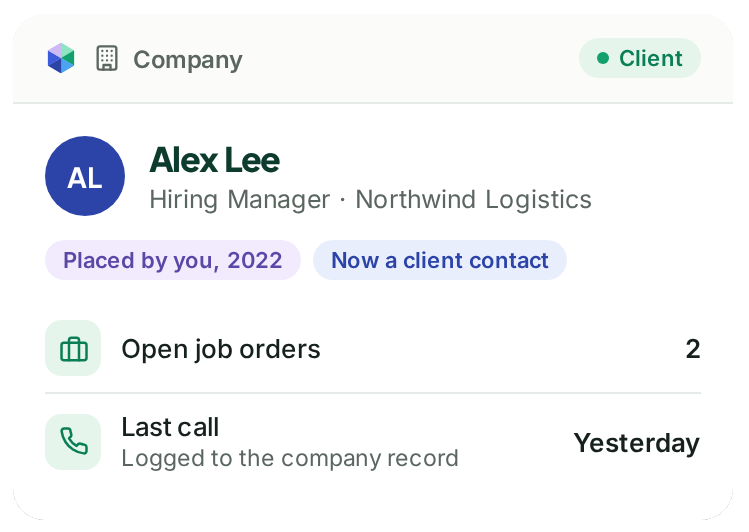
One Database for Candidates and Clients
In agency recruiting, the person you placed three years ago can be the hiring manager who calls you next month. If candidates and clients live in separate systems, or in a spreadsheet next to the ATS, that history splits in two and somebody ends up retyping it.
PCRM is organized around the company. Contacts, candidates, job orders and placements all connect to the company record, so when a former candidate becomes a client, the whole relationship is already there.
Email threads land on the record through the Outlook, Office 365 and Gmail integrations, so nobody copies and pastes a conversation into a notes field. Multi-function lists let you work a shortlist without exporting it first.
Retained Search · VP Finance
Longlist
Shortlist
Client Interview
Pipelines Configured per Role Type
A retained search and a contingency role rarely move through the same stages. A single fixed pipeline forces one of them to pretend.
In PCRM you set up a pipeline for each type of role, with your own stage names, and move candidates through it with drag and drop. Custom forms capture the fields your clients ask for. Screen layouts show each person the fields they actually use, which matters more than it sounds if your team has ever complained that the system is click heavy.
Deals Track the Opportunity, Not Your Memory
Business development is where a lot of agencies lose track. A promising conversation with a hiring manager tends to live in one recruiter’s head, right up until that recruiter is busy, or leaves.
Deals give you a sales pipeline next to your recruiting pipeline. Each deal sits on the company record with its stage, a temperature rating, a probability and a projected value, along with the tasks, emails, calls and texts that go with it.
So when you want to know what next quarter might look like, you can open the system instead of calling a meeting. When a consultant moves on, the client history stays with you.
What Is the Difference Between an ATS and a Recruiting CRM?
An applicant tracking system follows applicants through the hiring steps for a specific job. It grew up inside employers filling their own roles, and it does that part well.
A recruiting CRM manages relationships over time. For an agency those relationships run in two directions, with the candidates you place and with the clients who pay you, and a lot of the value sits in conversations that happen before any job order exists.
Most agencies need both, which is perhaps why so many end up running two tools and a spreadsheet between them. PCRM is an ATS and a recruitment CRM in one database, so the applicant you tracked last spring is the same record you stay in touch with this fall.
| Capability | ATS | Recruiting CRM | PCRM |
|---|---|---|---|
| Tracks applicants against a job | Yes | Sometimes | Yes |
| Manages client and company relationships | Rarely | Yes | Yes |
| Tracks business development and deals | No | Often | Yes, with Deals |
| Keeps history after a placement | Limited | Yes | Yes |
PCRM is shaped around boutique and growing recruiting firms placing permanent roles, typically up to 25 recruiters, and around executive search firms running retained and contingency work side by side. See how it fits boutique agencies → or executive search firms →. If you are working through a requirements list, the full feature list has every capability on one page →
Support
When You Call,
We Pick Up.








Under 30 Seconds

One Business Day

4.6 Out of 5
Recruiting CRM Questions
What is recruitment CRM software?
Recruitment CRM software stores and organizes your relationships with candidates and clients, so you can track conversations, pipelines and placements in one place. PCRM combines a recruitment CRM with an applicant tracking system.
Is PCRM an ATS or a CRM?
Both. Candidates, applicants, clients and deals share one database, so you do not have to sync two systems.
Can I set up different pipelines for different types of role?
Yes. Each role type can have its own stages, and you move candidates through them with drag and drop.
Can I track business development in the same system?
Yes. Deals track opportunities against the company record, with stage, probability, projected value and the activity that goes with them.
Can I bring my existing candidate and client records across?
Yes. We do the migration work, and you get a straight answer on time and cost before you commit. Complete migration, including validation, mapping, test runs, customer review, and final production load, typically takes 2 to 8 weeks. Database size affects timing. See how switching works.