Candidate Sourcing

Candidate Sourcing, Job Posting and Resume Parsing in One Place

Candidates reach you as resumes in your inbox, profiles you find online and applications to the jobs you post. PCRM brings all three into the same database, parsed and searchable, so a good candidate does not sit in a folder waiting to be typed in.
Security pcrm

SOC 2 Examined

Headphone pcrm

US-Based Support

Calendar pcrm

Since 1998

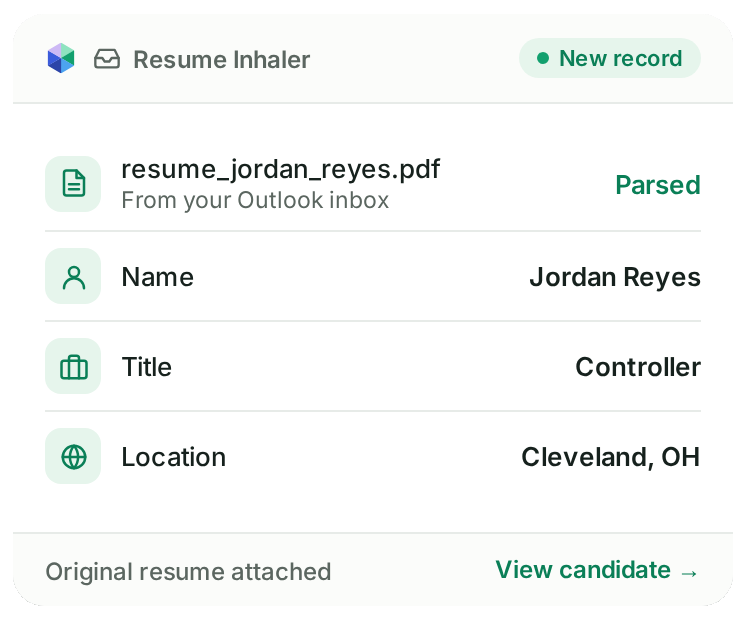
Example of Resume Inhaler parsing a resume into a new PCRM candidate record
Folder

Resume Inhaler Reads What Comes In

Resume Inhaler parses resumes from Outlook or your desktop into candidate records, with the original document attached.

The text stays searchable, so a resume that came in on a Tuesday two years ago is part of what you search today. How many good candidates are sitting in your inbox right now, not in your database?

World

PCR Capture Pulls Candidates From the Browser

PCR Capture is a browser extension for Google Chrome and Microsoft Edge that makes importing, updating, and merging contacts from popular social networks and other websites a snap.

If that person is already in your database, PCR Capture updates or merges the record instead of creating a second one. You skip the copy and paste, and you avoid calling a candidate you already know as if they were new.

Release

Post Once, Reach the Boards You Use

Post a role to the careers page on your own website and out to your job boards from the same screen. PCRM connects to boards including Indeed, LinkedIn, ZipRecruiter, Monster, Dice, CareerBuilder and Seek, plus XML feeds to specialist and regional boards.

If your website runs on WordPress, the PCRecruiter job board plugin keeps your careers page in sync with your open job orders.

Suitcase

Applications Land on the Job Order, Not in an Inbox

When somebody applies, they arrive on the job order they applied for as a candidate record. Nobody has to forward, download or retype anything before a recruiter can review them.

From there they can go straight into the pipeline for that role in the recruiting CRM →

Need Contacts From Outside Your Database?

PCRM does not buy contact data or search the open web for you. If that is part of how your team sources, connect one of the twelve sourcing tools on our integrations list.

ZoomInfo and hireEZ both export into PCRM in one click, with no CSV file in between. DaXtra, eGrabber, Interseller and others are on the list too.

Support

When You Call,

We Pick Up.

Our support team is US based and employed by PCRM. Call and a real person picks up. Prefer to write? Open a ticket and it goes to the same team.
Icons8 customer support

Under 30 Seconds

Average time to answer the phone
Icons8 training

One Business Day

To get your first training session scheduled after your onboarding call
Capterra logo

4.6 Out of 5

For customer service across 380 reviews

Sourcing Questions

Yes. Resume Inhaler parses resumes from Outlook or your desktop into candidate records and keeps the original attached and searchable.
Yes. You post from one screen to your own careers page and to the boards you connect, including Indeed, LinkedIn, ZipRecruiter, Monster, Dice, CareerBuilder and Seek.
It checks for the person first and lets you update or merge the existing record instead of creating a new one.
Yes. There are twelve sourcing integrations, and ZoomInfo and hireEZ export into PCRM in one click.

Bring a Real Job Order

Show us a role you are working on and we will show you how the candidates would reach it in PCRM.