
PCR Quick Search Improvements

The PCRecruiter system has been updated today, and the most noticeable change you’ll find is the replacement of our ‘Quick Find’ feature with a new ‘Quick Search’. This search box appears in the upper right hand corner of the PCR screen.
Security 1

SOC 2 Certified

Headphone

US-Based Support

Calendar

Since 1998

To use the new search, just click into the box and enter any name, company, title, phone, email, or Job ID. Hit enter and you’ll be presented with a list of matches across all three of the major record types — Names, Companies, and Positions.

Each result in the list will include key details like the record’s status, latest activity, links to related jobs or applicants, and links to lists it appears on. Click on the item to go to that record, or use the menu icon at the right of the result for shortcuts to common actions like composing email, launching a call, adding a profile, entering notes and activities, sending a PCR Notification, and more.
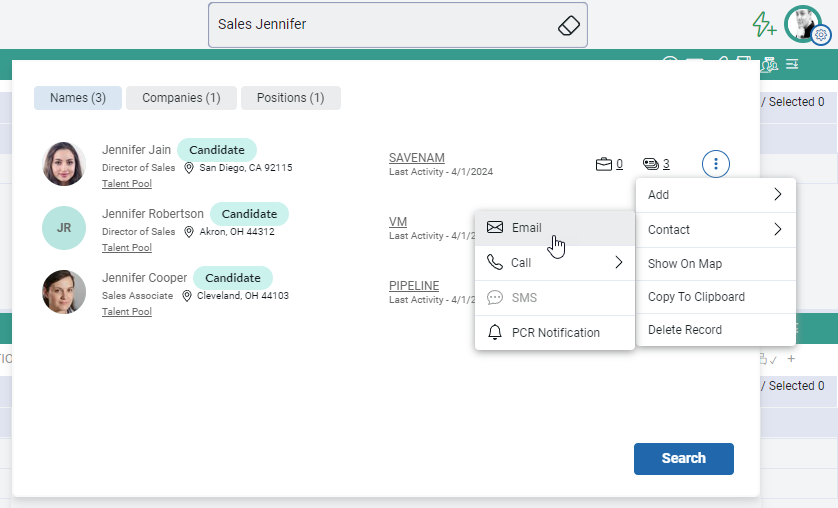
The PCRecruiter Quick Search finds Names, Companies, and Positions in your database.
In this example, a Quick Search for “sales Jennifer” found three candidates named “Jennifer” with “Sales” titles, plus a company called “Jennifer Monroe Sales Associates” and a “Director of Outside Sales” position with a hiring contact named “Jennifer Stevens.”

After you’ve started using the Quick Search box, you will automatically be presented with your recently run quick searches when you click into it again. Select any of them to quickly re-run the same search for the latest results.

Watch this space…

The new Quick Search in PCR is in preparation for some very big news we’ll be revealing this month, so watch this blog, our social media, or your email inbox for announcements. We think you’ll like what we have in store!


2 Responses

  1. Great update! I have a hunch for what is coming next but I’ll keep it to myself until we all find out. 🙂

Suggested Articles

Pcr your data is yours landscape slide2 1 1

Your Data Is Yours. Always.

“Your data is yours” is easy to say. Here’s how it works at PCRM: a private single-tenant database, an independent SOC 2 examination, a clear line on AI training, and plain answers on what happens if you leave.

Read More →
Pcr speak with a real landscape slide1 1

How Fast Does Your Recruiting Software Pick Up The Phone?

A candidate is hours from accepting a counter offer and your system won’t cooperate. What does waiting in a ticket queue cost a boutique recruiting firm, and why does support response time so rarely make the software shortlist? Here are PCRecruiter’s support numbers, plus four checks you can run on any vendor before you sign.

Read More →

Want to learn more about PCR?

Whether you’re just getting started or an industry vet, we’d like to help.